
Most business owners we talk to have reached the same point. They know AI could save them time and money. They've seen the headlines and maybe played with ChatGPT. But when it comes to their own business, they have no idea where to start.
The usual advice is to "do a full review of the business and build an AI strategy". That's not wrong, but it's slow, it's expensive, and when you're running a business it tends to sit on the to-do list forever.
There's a quicker way. Whatever the industry, deciding where AI is worth the effort comes down to the same handful of questions. Answer them for the jobs in your business that eat the most time, and the starting point usually becomes obvious.
Start with your work, not with AI
The most common mistake is starting with a tool. Someone sees a demo, signs up for a subscription, then goes looking for a problem it can solve.
Flip it around. Start with a list of the jobs in your business that take up time or cause headaches. Quoting. Chasing invoices. Writing up notes after meetings or jobs. Rostering. Answering the same customer questions over and over.
Don't overthink it. Ten to twenty tasks is plenty, and rough numbers are fine. Ask the people who actually do the work too. The front desk, the office and the people out with clients will each know things the others don't.
Six questions to ask about each task
For every task on your list, answer these. The first four you can do yourself. The last two are where some outside help is useful.
- What actually happens? Describe it in plain words, including the messy bits. "Invoices arrive by email, someone retypes them into the accounting system, then chases approvals" is far more useful than "accounts payable".
- Who does it? This matters more than people expect. An hour of admin time costs one thing. An hour of your most expensive people (a lawyer, clinician, engineer or tradesperson) doing paperwork costs their billable rate, because that's an hour they're not billing.
- How much time does it take? How often it happens multiplied by how long it takes. Twenty times a week at ten minutes each is over three hours a week, or around 150 hours a year.
- How much does it hurt? Some tasks are quick but costly when they go wrong. Missed invoices, compliance slip-ups and unhappy customers count, not just time.
- How well does AI suit it? AI is good at reading, writing, summarising, sorting and pulling information out of documents. It's not good at judgement calls, relationships or anything physical. Most tasks land somewhere in between.
- How much effort to fix? Some fixes are a setting in software you already pay for. Others need systems connected together, or something built from scratch.
Multiply the hours by the hourly cost and you have a dollar figure for each task. That number alone often changes what people think their biggest problem is.
Sort them into four groups
Once you know the benefit of each task (its dollar cost, how much it hurts and how well AI suits it) and the effort to fix it, every task lands in one of four groups.
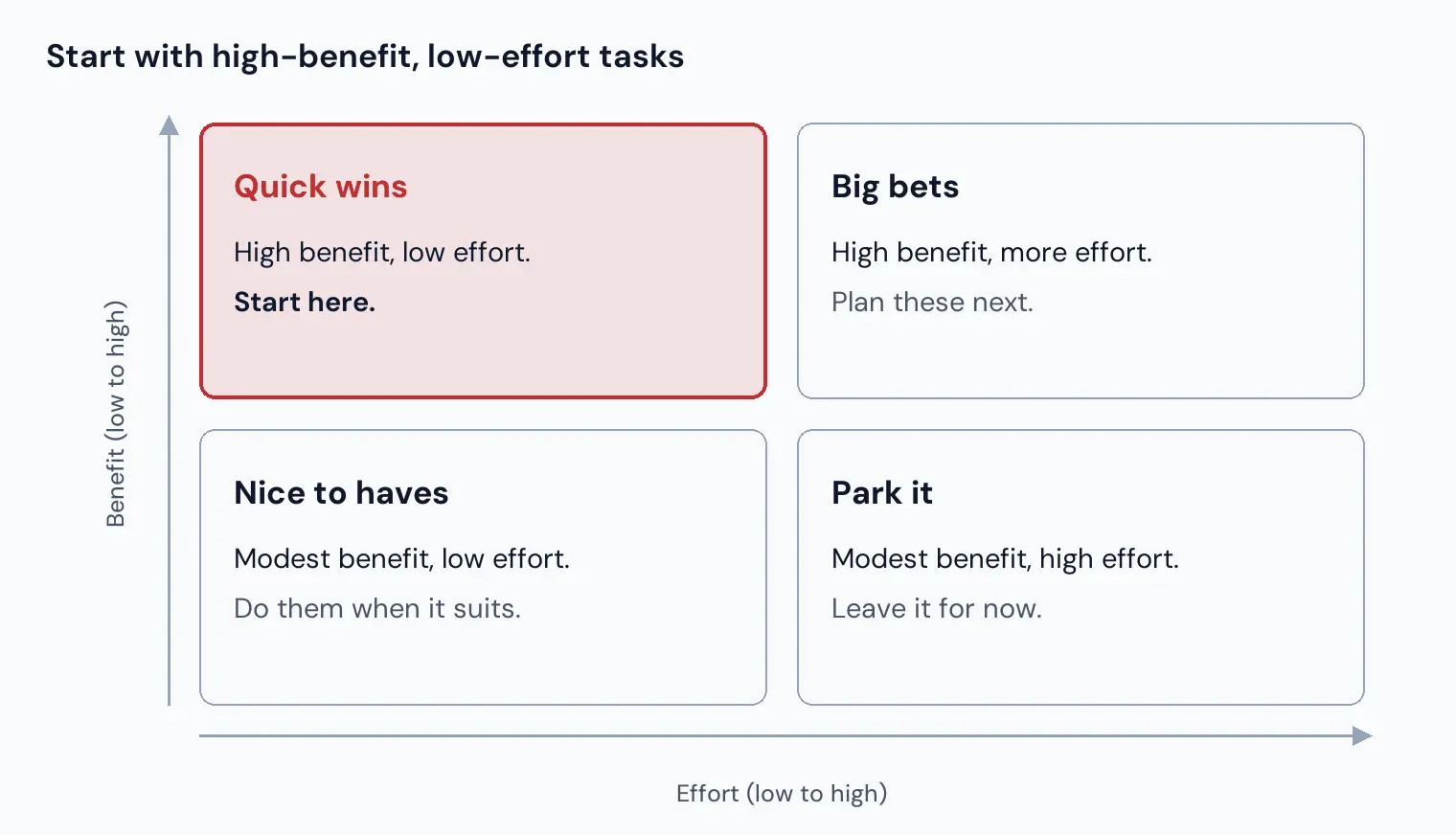
Quick wins come first. They build confidence, free up time and pay for the bigger projects. Big bets are often where the real money is, but they deserve proper planning. Nice to haves can wait until there's a gap, and anything in Park it should stay parked, however exciting the demo looked.
Check the software you already pay for
Before building anything, check what your existing software can already do. The big business platforms are adding AI features at a remarkable pace. Practice and job management systems, accounting packages and CRMs have all shipped AI tools in the past year, often included in a higher plan or a recent upgrade.
So for each task, ask whether your software already does it, does part of it, or has it on the way. Sometimes the best answer is "switch on a feature you're already paying for". That's not glamorous, but it's the cheapest win there is.
It also changes how hard everything else is. If your main system lets other tools connect to it, plenty of jobs become a quick integration. If it doesn't, the same jobs can be a much bigger project.
Don't stop at fixing what you already do
Everything above is about doing today's work with less effort. That's a great place to start, but it has a blind spot. It will only ever find problems you already know you have.
Some of the biggest wins come from things that simply weren't practical before, because no one had the time to pull the information together. For example:
- A dashboard for the directors. Work in progress, money owed, profit by client or project, and how busy the team is, in one place. No more relying on someone's head or a Monday spreadsheet.
- Early warnings. An alert when a project is running over budget, a proposal has gone quiet, or a customer's payments are starting to slow.
- Using your own history. Years of quotes, proposals and results sitting in your systems can help you price the next piece of work more accurately, or decide whether it's worth chasing at all.
- Better reporting for your customers. Automatic, professional reports for your clients can help you win and keep work, not just save time.
To find these, ask yourself one question: what do you wish you could see about your business right now that you can't?
A worked example
Take a typical trade business with a team of tradespeople in the field. One task that comes up again and again is writing up jobs. Here's how it scores (the figures are illustrative). Swap in your own industry and the scoring works the same way.
- What happens: Tradies jot notes and materials on paper or in texts. The office retypes them into the job system and builds the invoice.
- Who does it: Tradespeople, then office staff.
- Time: About 40 jobs a week at 10 minutes each, so nearly 7 hours a week of field time.
- Cost: At a $110/hour charge-out rate, that's around $34,000 a year, before counting the office's retyping.
- Pain: High. Notes get lost, materials get missed and invoices go out late.
- AI fit: Good. A voice note on site can become a draft job report and materials list for the office to check.
- Effort: Low to moderate, depending on what the job system already offers.
High value, good fit, modest effort. That's a quick win, and a far better first project than whatever AI tool happened to be in the news that week.
Getting started this week
You don't need a consultant or a six-month strategy to take the first step. You need an afternoon.
- List 10 to 20 tasks that eat time or cause headaches, with input from your team.
- For each one, note who does it, how often, how long it takes and how much it hurts.
- Turn that into hours a week and dollars a year.
- Check whether your existing software already handles any of them.
- Score AI fit and effort, sort into the four groups, and start with the quick wins.
- Then ask what you wish you could see about your business, and add those ideas to the list.
Want a hand?
If you'd like a hand working through it, get in touch with Red Crow Digital. We'll go through your list with you, score AI fit and effort, check what your current software can already do, and point out the opportunities you might not have thought of. You'll come away knowing exactly where to start, and whether it's worth doing at all.